

4 Mobile EHR Features That Will Have You Feeling Lucky This St. Patty’s Day
It’s already 2023 and some providers still are not sure whether or not they need a mobi...
September 28, 2026
Specialty medicine rarely stands still. You might start your morning rounding at the hospital, head to the clinic by mid-day, squeeze in a telehealth visit, and finish with a procedure.
Between all of that, you still need to review charts, sign off on documentation, adjust a schedule, send a prescription, check an image, and message a colleague. That’s a lot to manage from a desktop that’s stuck in one room.
This is exactly why a mobile EHR has become such a valuable asset for specialty providers. When your patient information travels with you, so does your ability to make fast, confident decisions.
Mobile electronic health records give you the flexibility to respond in the moment, wherever “the moment” happens to be. The result is fewer delays, smoother handoffs, and more time focused on patients, not logistics.
This article unpacks how mobile EHR software has evolved in specialty care. We also reveal how it can help you manage charts, documentation, scheduling, prescriptions, imaging, and secure communication across every care setting, improving responsiveness and reducing delays in fast-moving specialty environments.

Not too long ago, EHRs meant sitting at a fixed workstation. You logged in, charted, logged out, and moved on. It worked, but it tied clinical work to a physical spot. For specialists who are constantly on the move, that setup created gaps.
Specialty clinics—such as urology or nephrology—also have unique workflows that these traditional, one-size-fits-all EHRs historically failed to support.
These key differences created demand for specialty EHRs and accelerated the need for mobile-first solutions. EHR vendors then began building apps and cloud-based tools that put patient data on the devices you already carry. Researchers agree that this evolution and the advent of the mobile EHR improved the efficiency and accuracy of health care delivery.
The shift from clunky desktop-only systems to true point-of-care mobile solutions gave specialists something they’d been missing: the freedom to work from anywhere. Here’s why that matters so much in specialty care.
With a mobile EHR, a specialist pulls up the chart on a phone or tablet, reviews the notes, and keeps moving. Those saved minutes add up fast across a full practice day.
Quick, reliable access to patient charts is the backbone of good specialty care. When records are a tap away, you spend less time hunting for information and more time acting on it. That’s true whether you’re confirming a lab result, reviewing a medication list, or updating a note right after seeing a patient.
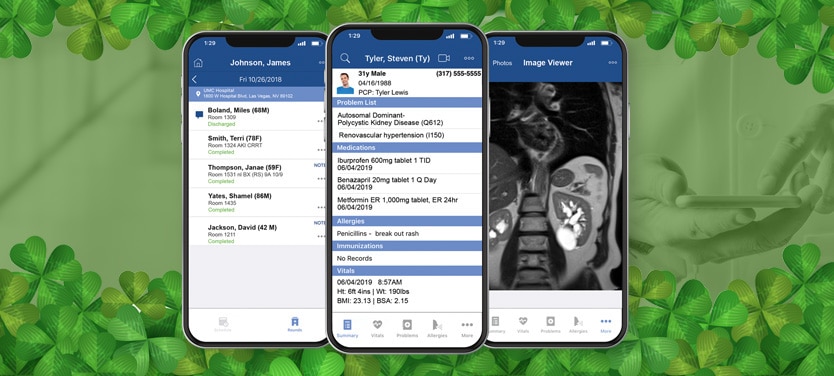
Let’s look at nephrology, where location-based tracking really shows its value. A strong specialty mobile EHR should let you track dialysis rounds by location and add a dialysis visit to a patient’s chart right inside the system.
That’s a big deal. It helps you quickly identify patients who have met the four-visit threshold for dialysis, which supports accurate documentation and proper billing. Instead of piecing together visit counts later, you capture them in real time, exactly where care happens.
Faster access also means faster decisions. When you can review imaging, history, and current medications on the spot, treatment planning speeds up. You’re not waiting for someone to fax a record or pull a file. You see what you need, weigh your options, and move forward.

Scheduling can really make or break a specialty practice. No-shows leave gaps, last-minute changes create chaos, and double-bookings frustrate everyone. Mobile scheduling helps you stay ahead of it all.
With a mobile EHR, you and your staff can view, adjust, and confirm appointments from anywhere. Automated reminders help cut no-shows, and open slots fill faster because you can see availability in real time. When plans shift, you adapt without scrambling.
Communication plays a huge role here too. Consider an orthopedic practice managing a patient recovering from knee surgery. If that patient calls with new swelling and pain, staff can quickly message the provider, check the schedule, and slot in an urgent follow-up, all from a mobile device.
The patient gets reassurance and timely care, and the practice avoids a missed opportunity to intervene early. That’s coordination that actually feels seamless.
Specialty care depends on teamwork. You’re often coordinating with nurses, medical assistants, referring physicians, and support staff throughout the day. When you can reach the right person instantly, care keeps moving.
A mobile EHR makes real-time communication easy. Need a quick answer from a colleague? Want to flag something for your nurse before the next appointment? Secure messaging keeps everyone connected without endless phone tag.
Of course, all of that communication has to be secure. According to the National Cybersecurity Center of Excellence, mobile EHR devices can introduce vulnerabilities in a healthcare organization’s networks, leading to cyberattacks. This can involve hackers exploiting mobile devices and wireless networks to steal patient data or disrupt clinical operations.
Patient privacy also needs protection. That’s why compliance can’t be an afterthought, and Mobile EHR apps must protect patient data using strict technical, physical, and administrative safeguards required by the HIPAA Security Rule.
Luckily, quality mobile EHR software uses HIPAA-compliant messaging, heavy encryption, and secure access controls to keep sensitive information safe. You get the speed of instant communication with the confidence that patient confidentiality stays intact.
Mobile access is especially valuable in two areas: imaging and prescribing. Both can create delays when they’re tied to a single location, and both move faster when they’re in your pocket.
Reviewing medical images on the go is a real advantage for specialists. Take urology. A urologist reviewing a CT scan for a suspected kidney stone can pull up that image on a mobile device between appointments or even while consulting with the patient.
Instead of stepping away to a dedicated workstation, the provider reviews the image, explains findings clearly, and discusses next steps right there. That immediacy improves both efficiency and the patient experience.
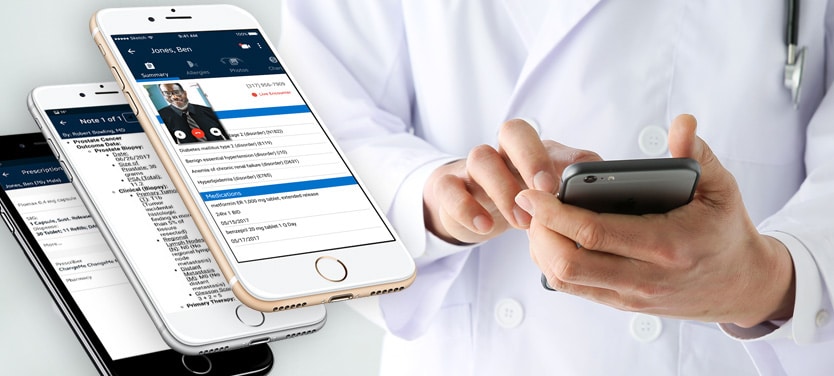
Prescribing benefits just as much. A simplified prescription process saves time and reduces errors, which matters in every specialty. In pain management, for instance, where medication regimens are complex and often tightly regulated, mobile prescribing offers real advantages.
Modern mobile EHR software lets providers easily choose from a pre-populated list of prescriptions most pain specialists use nationwide. You should also be able to review patient history and send prescriptions securely from anywhere.
That helps you stay responsive to patient needs while maintaining careful oversight of controlled substances. Fewer delays, tighter tracking, and safer medication management, all in one place.

If you’re ready to bring mobility into your practice, it helps to know what to look for. Not every mobile EHR for specialists offers the same depth. As you evaluate options, focus on tools that actually match how specialty care works.
Look for a mobile EHR that delivers:
iSalus offers a mobile EHR designed specifically for specialty providers, so you stay connected to your EHR and key patient information from anywhere, anytime, through a powerful mobile app.
With the iSalus mobile EHR, your specialty practice can:
Put simply, the right mobile EHR removes the friction that slows specialty care down. It keeps your charts, schedule, prescriptions, imaging, and team communication within reach, so you can focus on your patients instead of chasing information.
Ready to see what mobile-first specialty care feels like? Discover how the iSalus mobile EHR can help you stay connected and work smarter, wherever your day takes you. Schedule a demo today!
A mobile EHR is a version of your electronic health record system that you access through a smartphone or tablet app. It connects securely to your practice’s data, so you can view and update patient charts, schedules, prescriptions, and images from anywhere. It syncs with your EHR in real time, keeping your information current whether you’re in the clinic, at the hospital, or on the go.
Mobile EHR for physicians offers speed, flexibility, and better responsiveness. You can review charts between appointments, document at the point of care, send prescriptions, check images, and message your team without being tied to a desk. That saves time, reduces delays, and helps you make faster, more informed decisions.
Mobile EHR software is built to match the pace of specialty care. It streamlines chart access, supports location-based tracking like dialysis rounds, simplifies scheduling, and enables real-time collaboration. By removing bottlenecks from fixed workstations, it keeps your whole practice moving efficiently.
Yes. A quality mobile EHR gives you real-time access to patient charts, current prescriptions, problem lists, notes, insurance details, and your appointment schedule. You can review and update this information securely from your mobile device, so everything you need travels with you.
Mobile electronic health records let you act in the moment instead of waiting for a workstation, a fax, or a callback. You can document during a visit, send a prescription on the spot, review an image between rooms, and message your team instantly. That real-time responsiveness reduces delays and keeps care flowing smoothly.
It’s already 2023 and some providers still are not sure whether or not they need a mobi...
It seems like everything has an app in the present day. The world is accessible at our ...
Most practices across the United States have integrated the use of the electronic healt...